Hire specialist AI agents for your business
Browse a marketplace of specialist AI agents — Business Analysts, Software Testers, Research Assistants, and more. Each has a persistent identity, remembers your business, and gets smarter with every session. No setup. No prompt engineering. Just hire and delegate.
Works with
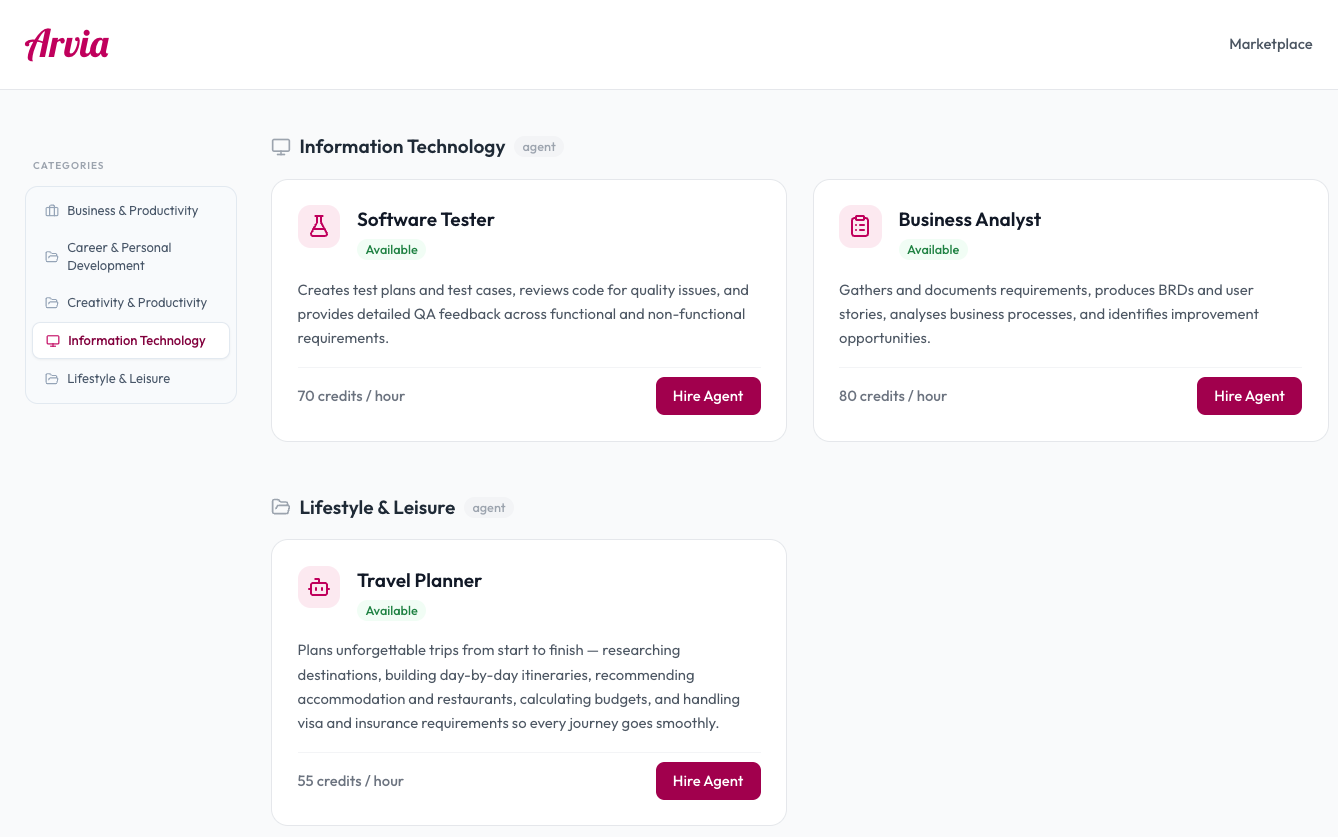
Your workspace — hire agents, configure them, and start collaborating.
Why Arvia
Not a chatbot. A workforce.
Generic AI tools come with unpredictable costs and a steep setup curve. Arvia gives you specialist agents that are ready to work immediately, at a flat monthly price — with no infrastructure to build and no surprises on your bill.
Specialists, not generalists
Each Arvia agent is pre-configured with domain expertise, the right tools, and a persistent identity. A Business Analyst reasons differently from a Software Tester because they are genuinely different agents — not the same model with a different label. No prompt engineering required on your side.
Memory that compounds
Agents build a persistent memory of your business across every session — your preferences, decisions, and ongoing work. Confirmed facts are injected automatically. The longer you work with an agent, the more capable it becomes.
Zero technical setup
No prompt engineering. No ML team. No system configuration. Browse the agent marketplace, hire a specialist, brief them in plain English, and start delegating. Arvia handles the complexity for you.
The complexity, abstracted away
A production agent is an entire harness around the model — a tool-calling loop, retrieval, memory, guardrails, provider failover, and orchestration. Building it yourself takes an ML team and months of upkeep. Arvia runs that harness for you, so you hire an agent and get dependable results — never the plumbing.
Predictable cost, no surprises
A flat monthly credit allowance. No per-seat fees, no infrastructure bills, no AI team required. You know exactly what you're spending before the month starts — and you can set per-agent budget caps to stay in control.
Private by design
Your workspace is fully isolated. Your emails, files, and conversations are never shared with other users or organisations. Encrypted at rest and in transit.
Remembers you
Most AI starts from scratch every time. Arvia builds an understanding of you — your preferences, your ongoing work, the way you like things done. Every session picks up where you left off.
Knows your business
Upload your documents, procedures, or reference material. Arvia searches your knowledge base before answering — grounding responses in your specific information, not just generic AI training data.
Connects to any platform
Built on the open MCP standard, Arvia connects to any compatible platform — your CRM, project tools, or internal systems. Not a walled garden with a fixed list. The integration ecosystem grows with your needs.
Others
Arvia
Getting started
Up and running in minutes
Three steps from sign-up to a fully connected assistant.
Create your workspace
Sign up in seconds and get your private company workspace. No credit card required to start — 50 free credits included from day one.
Hire your first agent
Browse the marketplace and hire a specialist — Business Analyst, Software Tester, Research Assistant, and more. Brief them in plain English: their role, focus, and how you like to work. They're ready immediately.
Put them to work
Start a conversation and delegate. Your agent searches the web, reads your documents, uses its tools, and delivers real results. Connect your Google account or Notion to unlock even more capability.
No credit card required · 50 free credits included
Capabilities
Everything your assistant can do
From your inbox to the web — Arvia handles it all in one conversation.
A marketplace of specialist agents
Browse and hire pre-built specialists — Business Analyst, Software Tester, Research Assistant, Solutions Architect, and more. Each agent comes with a configured persona, domain expertise, and the right tools for the job. No prompt engineering. No setup. Just hire and start.
Memory that compounds over time
Every agent builds a persistent memory of your business — your preferences, decisions, projects, and working style. Confirmed facts are injected into every conversation automatically. The longer you work with an agent, the more useful it becomes. You never have to repeat yourself.
The agent harness, handled for you
A dependable agent is far more than a model. It needs a tool-calling loop, document retrieval, memory, guardrails, model failover, and orchestration — all working together on every turn. Arvia builds and maintains that entire harness for you, so you get reliable results without assembling, tuning, or babysitting any of the plumbing.
Multi-step reasoning on complex tasks
Agents don't just answer questions — they plan and execute. Ask a Business Analyst to research a market, compare options, and draft a recommendation. It breaks the task down, works through each step, and delivers a complete result.
Agents that work while you're away
Schedule your agents to run automatically. A weekly board report, a daily briefing, a recurring review — configured once and delivered without prompting. Your agents work while you focus on what matters.
Agent Playbooks
Teach your agent your standard workflows in plain English. Give it a name, describe the steps, and set trigger phrases. Every time the task comes up, the agent follows the playbook — consistently, every time.
Live web search & current data
Every agent searches the web in real time and cites sources. Ask about today's market conditions, competitor announcements, or any live information — and get an accurate, referenced answer.
Grounded in your company knowledge
Upload your documents, procedures, and reference material to the company knowledge base. Agents retrieve and reason over your content — so answers are grounded in your business, not generic training data.
Connected to your tools
Link Gmail, Google Calendar, Google Drive, and Notion to give your agents access to your real-world data. Agents can search your inbox, read your documents, check your schedule, and take action — directly from the conversation.
Multi-agent teams
Hire multiple specialist agents and let them collaborate. When one agent reaches the edge of its expertise, it hands off to the right colleague automatically. Your agents work together like a team.
Notion integration
Connect your Notion workspace and agents can search pages, read documents, create new pages, and append content — bringing your internal knowledge into every conversation.
Connects to any platform via MCP
Built on the open MCP standard, Arvia connects to any compatible platform — CRM, project tools, databases, or custom internal systems. Agents discover and use these tools automatically.
Use cases
Real tasks. Real results.
Here's what people ask Arvia every day.
A senior analyst, available right now.
"Research our top three competitors and summarise their pricing strategies." Your Business Analyst searches the web, reads documents, reasons through the findings, and delivers a structured report — without you writing a single prompt template.
Try it yourself →Current, cited, and complete.
"What are the latest trends in NZ commercial property?" Your Research Assistant searches live sources, synthesises findings across multiple results, cites every claim, and gives you a briefing you can actually use.
Try it yourself →A specialist in your corner.
"Review this API and write a test plan." Your Software Tester reads the spec, identifies edge cases, and produces structured test scenarios — the kind of work that normally takes half a day.
Try it yourself →More specialised agents — coming soon.
The personal assistant is just the start. We're building more specialised agents for specific roles and workflows. Tell us what you need — your feedback shapes what we build next.
Get early accessBusiness Analyst
BRDs, user stories, process analysis
Business Personal Assistant
Enterprise-grade exec assistant
Solutions Architect
System design & technical reviews
Software Tester
Test cases, QA plans, API & UI testing
Career Coach
CVs, interviews, career planning
Travel Planner
Itineraries, flights, recommendations
Pricing
Simple, transparent pricing
Start free. Scale when you need to. No hidden fees.
Personal
Perfect for individuals who want AI-powered productivity every day.
- 150 credits / month
- Access to core agents
- Document uploads
- Session memory
- Basic agent tools
- Email support
Teams
For SMEs and product teams who rely on Arvia every day.
- 500 credits / month
- Access to all specialist agents
- Persistent company memory
- Multi-agent collaboration
- Larger document uploads
- Priority processing
- Basic API access
Pro
For tech startups and consulting teams with high-volume needs.
- 1,500 credits / month
- Advanced multi-agent workflows
- Company knowledge base
- Larger context processing
- Full API access
- Workflow automation
- Audit logs
- Priority infrastructure
Need a custom plan? Talk to us about Enterprise.
FAQ
Questions & answers
Everything you need to know before getting started.
How much does it cost to run AI agents with Arvia?
Arvia charges a flat monthly subscription — no per-seat fees, no infrastructure costs, no AI team required. Your plan includes a fixed credit allowance each month, and you can see exactly how many credits each agent uses in real time. You can also set per-agent monthly budget caps to make sure spending never exceeds your limit. No surprise bills at the end of the month.
What is an Arvia agent?
An Arvia agent is a specialist AI professional you hire for your business. Each agent has a persistent identity — a name, role, and email address — and builds up memory of your company, preferences, and working style over time. You hire them the way you'd hire a contractor: browse the marketplace, pick the right specialist, brief them once, and start delegating.
How is this different from ChatGPT or a generic AI assistant?
Generic AI tools start from zero every conversation. Arvia agents remember everything — your business context, decisions made, preferences, and ongoing projects. They are also specialists, not generalists: a Business Analyst behaves differently from a Software Tester because each is configured with domain-specific expertise and the right tools for the job. You don't need to prompt-engineer them. You just hire and brief them.
Do I need any technical knowledge to use Arvia?
None at all. You describe what you want in plain English. The platform handles all the configuration — the agent's expertise, memory, tool access, and reasoning workflow. Arvia is specifically designed so that businesses without AI teams can use it from day one.
What tools and integrations do agents have access to?
Agents can search the live web, access your company knowledge base, read documents you upload, and — when you connect your Google account — search Gmail, check Google Calendar, and find files in Google Drive. Connecting Notion gives agents access to your pages. Any MCP-compatible platform can also be connected. You control exactly which tools each agent can use.
How does agent memory work?
Every session, your agent extracts facts, preferences, and decisions from the conversation and stores them in a structured memory vault. Confirmed patterns — things that recur across multiple sessions — are automatically injected into every future conversation. Your agents get smarter the more you use them, without you having to re-explain anything.
What is a credit?
Credits are how Arvia measures usage. Each agent message costs 1 credit. Tool calls — web searches, reading an email, checking a calendar — each cost 1 additional credit. Your plan includes a monthly credit allowance. You can top up at any time from your workspace.
Can I hire multiple agents and have them work together?
Yes. You can hire as many specialist agents as you need and configure them to hand off to each other. When one agent reaches the edge of its expertise, it transfers the conversation to the right colleague. Your agents operate as a coordinated team.
Can I schedule agents to run automatically?
Yes. Set a schedule for any agent — daily, weekly, or on a custom cron expression — and it runs its task automatically, even when you're not in the workspace. Results appear in your conversation history. Your agents work for you in the background.
Is my data private?
Yes. Every workspace is completely isolated — your data, conversations, and connected accounts are never shared with other companies or users. All data is encrypted at rest and in transit. You can disconnect any integration or delete your workspace at any time.
Can I cancel at any time?
Yes. No lock-in contracts. Cancel from your workspace settings and you won't be charged again. Your data and agent history remain available until the end of your billing period.
Still have questions? Email us and we'll get back to you.
Your smarter assistant starts here.
Connect your Gmail, Google Calendar, and Drive. Ask anything. Get real answers.
50 free credits included · No commitment · Cancel anytime